
Cliquez ici pour lire cette page en français
If your practice already runs its daily workflow on OrthoADVANCE, activating the DentalMonitoring integration removes the busywork that sits between the two tools. Create or open a patient's DentalMonitoring record straight from the OrthoADVANCE patient file — no double entry, no switching platforms to find the same patient, and no transcription errors creeping in when names or dates are re-typed.
For an orthodontic practice the pay-off is tangible: pair your existing OrthoADVANCE patients to their DentalMonitoring profile in one bulk sync, jump from the OrthoADVANCE patient card to the matching DM record in a single click, and drive day-to-day monitoring actions — pausing follow-up, stopping an action, reading messages, checking clinical events — without leaving OrthoADVANCE. Activation is included at no extra cost on either side.
Overview
The OrthoADVANCE integration links OrthoADVANCE with DentalMonitoring so patient data and monitoring actions stay aligned between the two platforms.
- Patient creation: create a new patient in DentalMonitoring directly from an existing OrthoADVANCE patient file.
- Patient pairing: bulk-match your OrthoADVANCE patients with their DentalMonitoring profile, then resolve any unmatched patients one by one.
- One-click patient access: open a patient's DentalMonitoring record straight from their OrthoADVANCE card.
- Monitoring controls: pause follow-up, stop a DM action and resend patient credentials from the OrthoADVANCE patient screen.
- Clinical inbox: read DM messages and clinical events for a patient without leaving OrthoADVANCE.
Prerequisites
- A DM API Key. If you have not done so already, generate your DM API Key.
Setup your OrthoADVANCE integration
Once you have your DM API Key, the rest of the setup happens inside OrthoADVANCE. You can either enter the details yourself or ask the OrthoADVANCE team to configure the module for you.
-
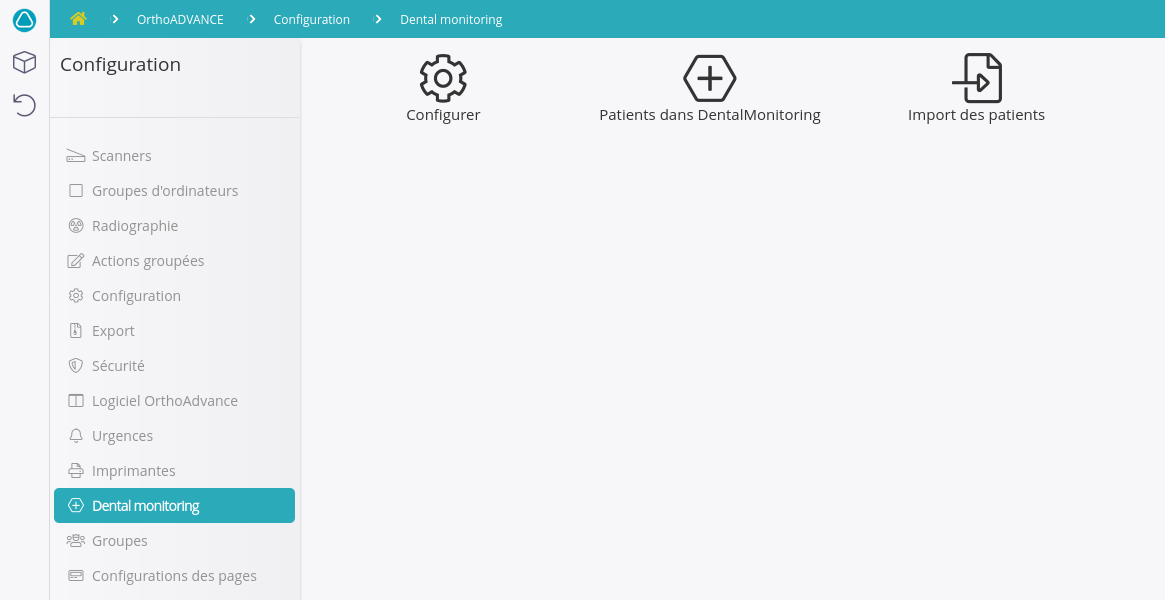
In OrthoADVANCE, open Fonctionnalités > DentalMonitoring and click Configurer.
-
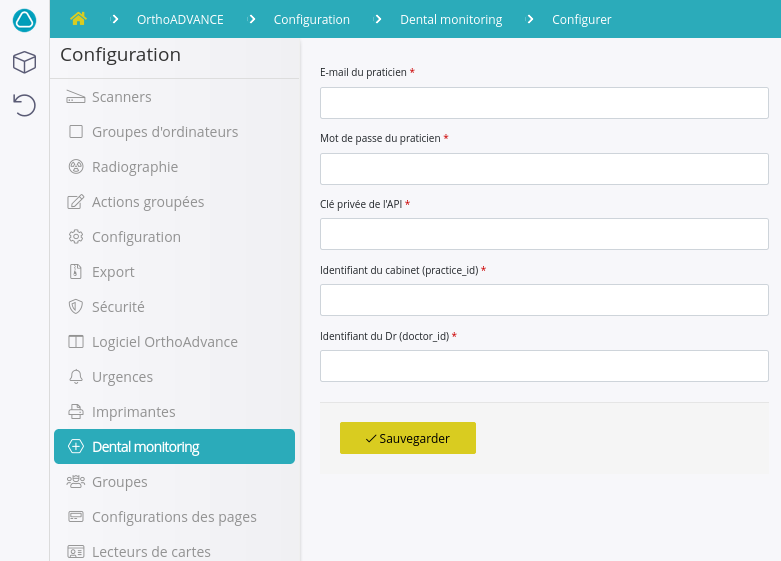
Fill in the configuration form:
- Email du praticien: the email address associated with your DentalMonitoring account.
- Clé privée de l'API: your DM API Key.
- Identifiant du cabinet (practice_id): the unique identifier of your practice.
- Identifiant du praticien (doctor_id): the unique identifier of the practitioner.
-
Click Sauvegarder to save the configuration.
Note
If you would rather the OrthoADVANCE team configure the module for you, send them your DentalMonitoring email and your DM API Key via a tracking sheet and they will fill in the form on your behalf.
Other information
Customer support
For any issue or question about the integration, you can contact either DentalMonitoring or OrthoADVANCE customer support interchangeably. Each team will escalate to the other partner if needed.
- OrthoADVANCE support: contact your OrthoADVANCE customer support representative.
- DM support: support@dental-monitoring.com